
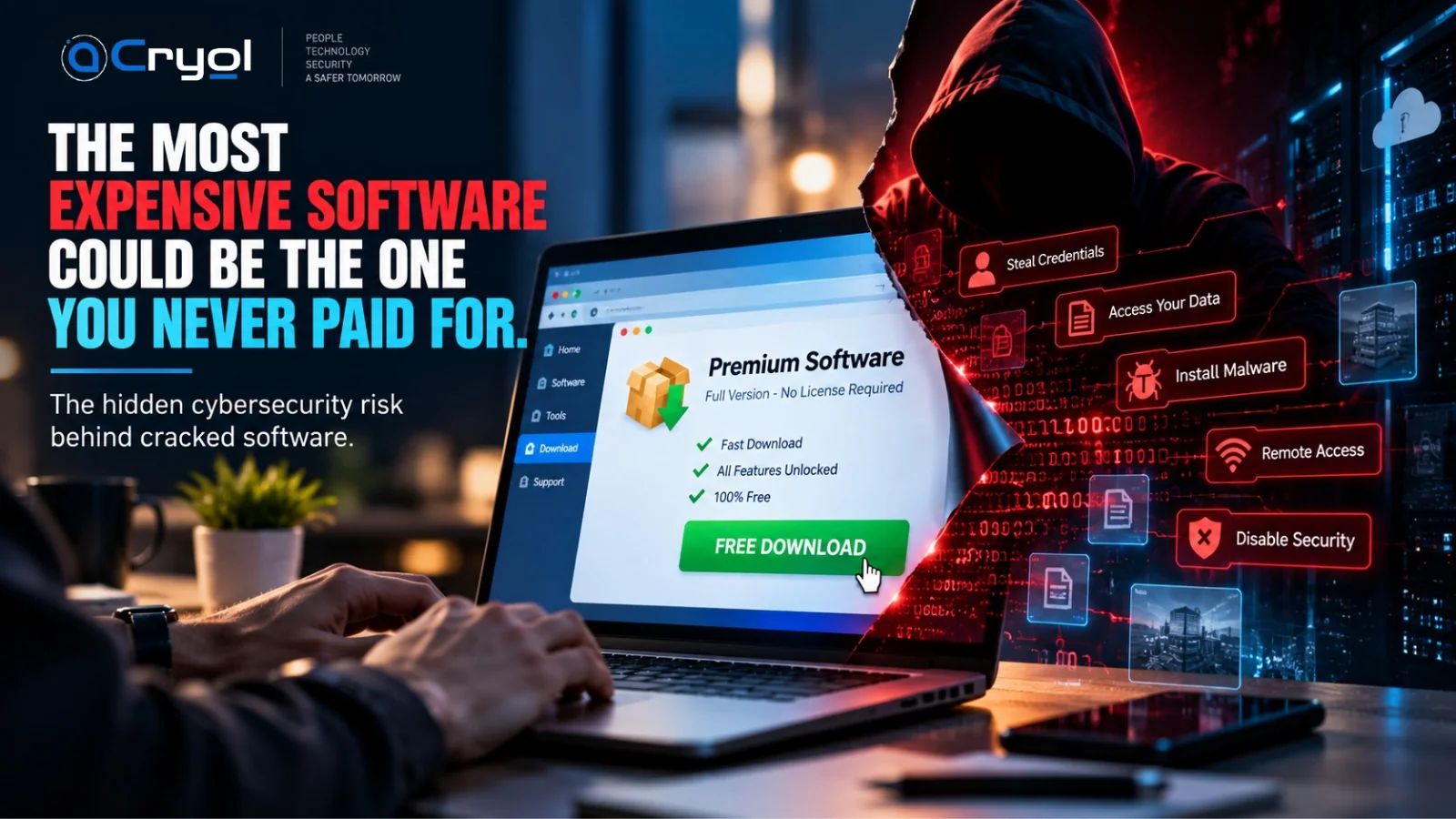
You need software that costs ₹5,000.
You search online and find another option: “Premium Version — Free Download.”
No subscription. No license fee. All features unlocked.
You download it. You install it. The application opens normally, and everything seems fine.
But there is one question most people never ask.
What else did you install?
The application you wanted may be running exactly as expected. At the same time, something you never asked for could be running quietly in the background.
That is the hidden risk behind cracked, pirated, tampered and unverified software. And for a business, it is rarely a ₹5,000 problem.
In short
- A cracked installer can work perfectly and still carry malicious code.
- Attackers are actively using fake download pages to deliver malware, and Microsoft documented one such campaign in September 2026.
- One compromised laptop can expose email, cloud apps, files and customer data through stolen credentials.
- No single tool fixes this. Awareness, approved software, endpoint protection, identity security and monitoring work best together.
What Is Cracked Software?
Cracked software is commercial software that has been modified to bypass licensing, activation, subscription or other restrictions set by its legitimate developer.
The cybersecurity problem isn't simply that the software was obtained without paying. The bigger problem is trust.
Once an installer has been modified and redistributed through an unknown source, nobody can reliably tell what else was changed. A modified installer could potentially be designed to:
- Steal credentials
- Collect sensitive information
- Establish persistent access
- Install additional malware
- Weaken security controls
- Communicate with attacker-controlled infrastructure
And the original application may still work perfectly. That is what makes the threat hard to recognize.
From “Free Download” to Corporate Compromise
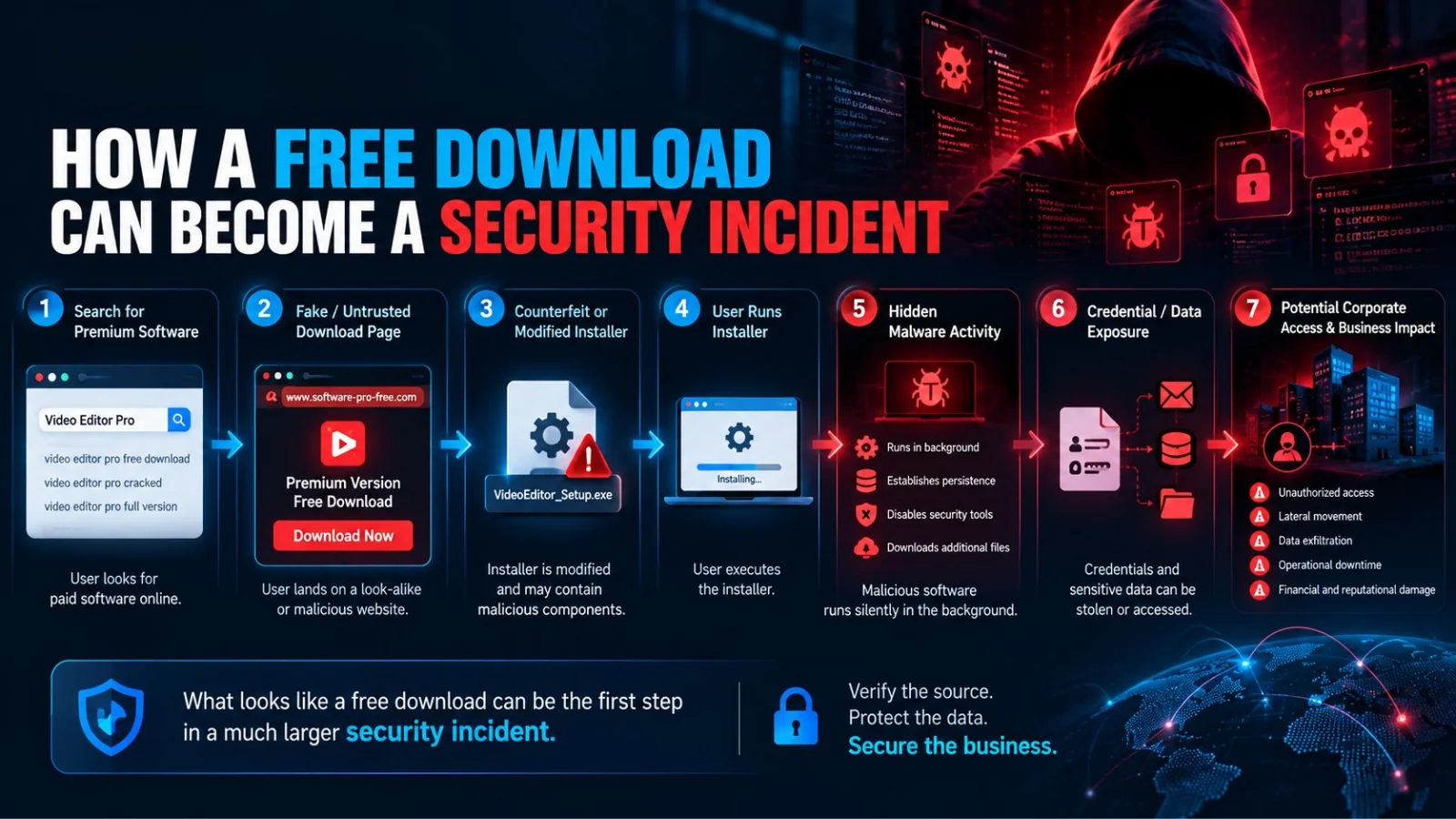
A malicious software attack can begin with something completely ordinary: a search for an application. A simplified attack chain looks like this:
- Search for software. The user wants a tool and looks for a free version.
- Fake or untrusted download website. The page looks professional and promises everything.
- Modified or counterfeit installer. The file contains the real application plus something extra.
- User runs the installer. Often with the permissions the user already has.
- Malware executes. It runs silently, and may try to stay on the system after a restart.
- Credentials or data are compromised. Passwords, sessions and files become targets.
- Attacker gains further access. One device becomes a door into the wider business.
The user believes they installed one application. The attacker sees something very different: an initial access opportunity.
This Is Already Happening: What Microsoft Reported
This isn't a hypothetical scenario. On 1 September 2026, Microsoft Defender Experts published research on an active campaign that used counterfeit software-download websites to impersonate trusted vendors and distribute malicious installers.
The look-alike pages carried a prominent “Download now” button and imitated vendors and products including Razer, Microsoft Edge and Kaspersky. Microsoft observed the malicious installers doing things such as:
- Creating disguised scheduled tasks that relaunched malicious payloads about every minute
- Adding broad exclusions so Microsoft Defender would not scan certain locations
- Deleting volume shadow copies, which are often used for recovery
- Disabling Windows Update services
- Contacting attacker-controlled servers on non-standard ports
Victims were seen across healthcare, manufacturing, gaming, technology, logistics, government and education. Microsoft noted that affected devices were predominantly tied to China-based operations and Chinese-speaking users, and that it had not attributed the campaign to a nation-state actor. The technique itself, though, does not depend on geography. Any organization where employees download software from unverified sources faces the same basic risk.
This campaign involved fake vendor download pages rather than cracked software specifically, but the lesson is the same:
A professional-looking download page does not guarantee a legitimate download.
The Attack Doesn't Have to Look Like an Attack
Many people expect malware to announce itself: a crash, an antivirus alert, files disappearing, a ransomware screen. Real attacks don't always work that way. An attacker benefits from staying unnoticed.
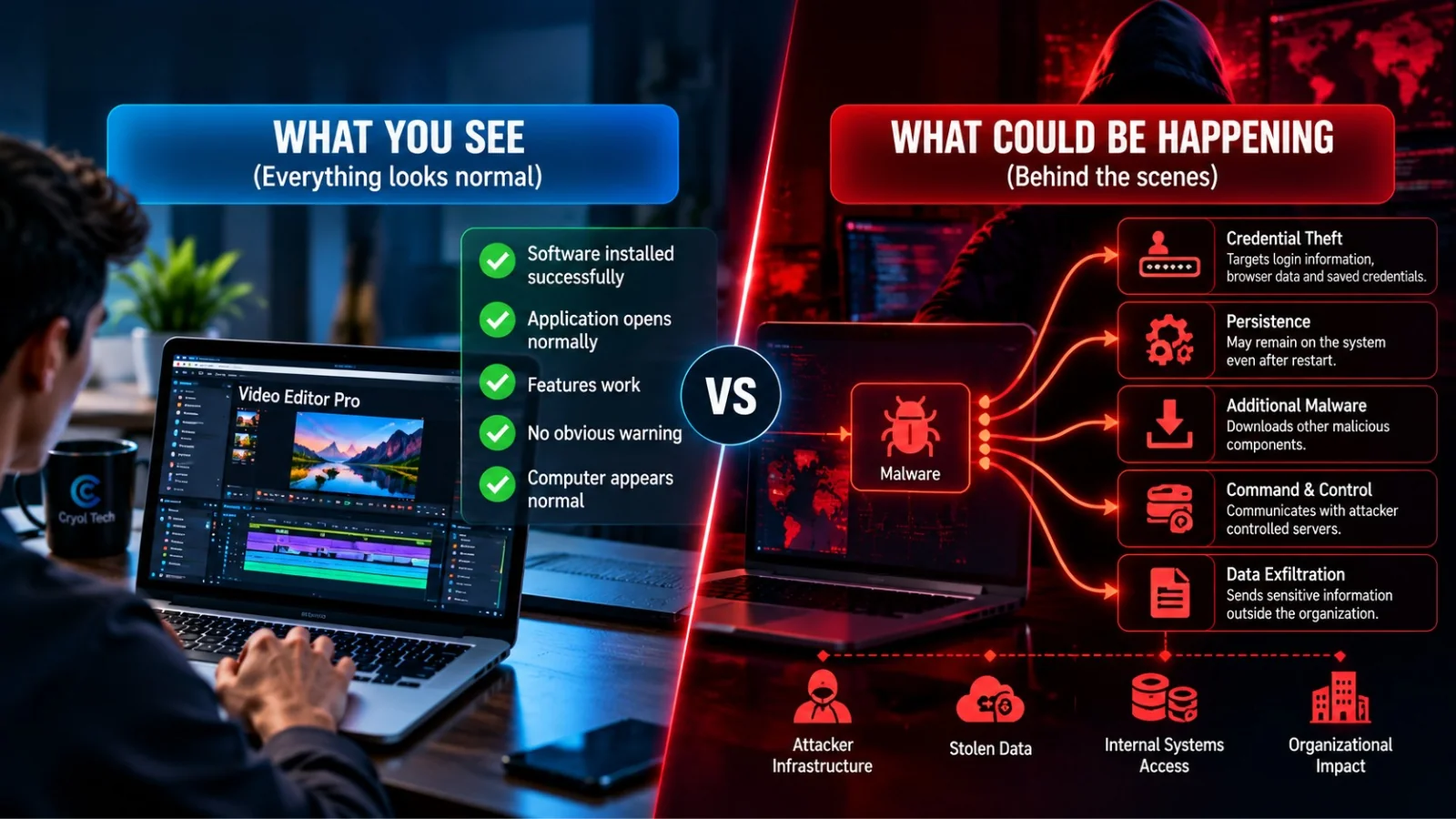
| What the user sees | What could be happening behind the scenes |
|---|---|
| Software installed successfully | Credential theft: login information may be targeted |
| Application opens normally | Persistence: malware may try to remain after a restart |
| Features work | Defense evasion: security tools or settings may be weakened |
| No obvious warning | Additional payloads: other malicious components may be downloaded |
| Computer appears normal | Command and control: the device may talk to attacker-controlled servers |
| Nothing seems wrong | Data exfiltration: sensitive information could leave the organization |
The dangerous part is that both realities can exist at the same time.
Why Credentials Are the Real Prize
Attackers don't always need to “hack” every application. Sometimes they need something much simpler: a valid account.
One corporate identity can open the door to:
- Cloud applications
- Internal systems
- Shared files
- VPN
- Business platforms
- Customer information
That is why endpoint security and identity security are increasingly connected. A compromised laptop can become an identity-security problem, and an identity-security problem can become an organizational one.
“But We Have Antivirus.”
That's good. But it isn't enough by itself.
Think about a bank. Would it protect millions of rupees with one lock on the front door? Of course not. It uses doors, access cards, cameras, security personnel, alarms, monitoring and procedures. Cybersecurity follows the same philosophy.
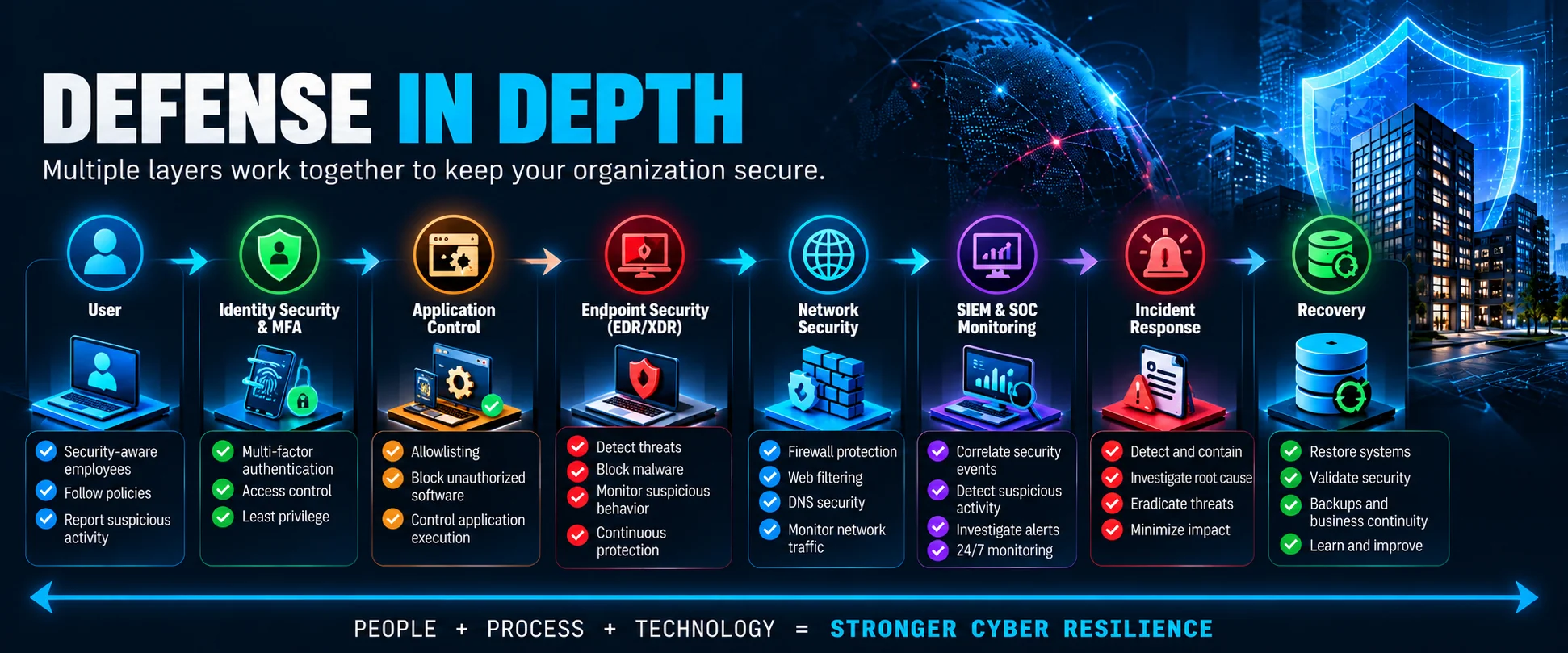
Defense in Depth
Defense in Depth means building multiple security controls so the organization isn't dependent on one technology working perfectly. A simplified model runs from the user, through identity security, application control, endpoint security and network security, to monitoring, incident response and recovery.
If one layer fails, another layer may still detect, restrict or contain the activity.
When ₹0 Becomes Expensive
Imagine avoiding a ₹5,000 software license. At first, you saved ₹5,000. Now imagine that application leads to a compromised corporate device. The consequences could include:
| Cost area | What it can mean |
|---|---|
| Operational downtime | Employees may be unable to access systems while the incident is investigated |
| Incident response | Teams must find the initial compromise, identify affected systems, contain the threat and understand its scope |
| Recovery | Devices may need to be isolated, rebuilt, restored or replaced |
| Lost productivity | Employees and technical teams lose working hours during investigation and recovery |
| Regulatory exposure | Compromised sensitive information may create legal or compliance obligations |
| Reputation damage | Customers and partners may lose confidence after a serious incident |
Suddenly, ₹5,000 saved can become a much larger organizational problem.
Software should never be judged only by its purchase price. Businesses also need to weigh security, integrity, updates, support, compliance and risk.
Free Software Is Not the Problem
This distinction matters. Free does not mean unsafe. Many excellent applications are legitimately free, and open-source software powers enormous parts of modern technology.
The problem isn't the word free. The problem is untrusted.
| Lower-risk path | Higher-risk path |
|---|---|
| Official vendor | Unknown website |
| Verified download | “Premium cracked version” |
| Authentic installer | Modified installer |
| Regular updates | Unknown behavior |
So the right question isn't “Is this software free?” It is:
“Can I trust its source?”
Warning Signs Before You Download
Be suspicious when a website promises things like:
- “Premium software completely free”
- “100% cracked version”
- “Activation bypass included”
- “Disable antivirus before installation”
- “All premium features unlocked”
- “Download modified version”
The biggest red flag is any installer that asks you to switch off security protection. If software requires you to weaken your security before it will install, stop and verify it with your IT or cybersecurity team.
What Employees Should Do
Employees are part of an organization's security architecture. These six habits make the biggest difference:
- Verify the source. Download from official vendors or organization-approved sources.
- Use approved software. Corporate devices should run applications the organization has authorized.
- Never disable security protection. Don't turn off antivirus, EDR, firewall or other controls just to make something install.
- Keep applications updated. Security patches fix vulnerabilities that attackers try to exploit.
- Protect corporate credentials. Never enter work credentials into unknown or unverified applications.
- Ask before installing. If you're unsure, contact IT or security.
Thirty seconds of verification can prevent a much longer incident investigation.
How Organizations Can Reduce the Risk
Employee awareness is only one layer. Organizations also need technical and procedural controls.
| Control | Goal | Why it matters |
|---|---|---|
| Application allowlisting | Prevent unauthorized applications from running | Even if someone downloads suspicious software, application controls may stop it from executing |
| EDR / XDR | Detect suspicious endpoint activity | Behavioral visibility goes beyond traditional antivirus signatures |
| Identity security + MFA | Reduce the impact of credential compromise | A stolen password alone should not give unrestricted access |
| Patch and vulnerability management | Reduce exposure to known vulnerabilities | Outdated applications give attackers extra opportunities |
| Network and web security | Control malicious or suspicious network activity | Firewalls, secure web gateways and DNS security can block known bad destinations |
| Sandboxing | Examine suspicious files in isolation | Unknown files can be analyzed without exposing production systems |
| SIEM and SOC monitoring | Detect and investigate suspicious activity | Endpoint, identity, network and cloud signals are far more useful when correlated |
| Secure backups | Maintain recoverable copies of critical data | Backups add a recovery layer during ransomware or destructive incidents |
| Incident response | Detect, contain, eradicate and recover | Prevention will never be perfect, so you need a plan for when something gets through |
A practical starting checklist for IT managers
If you can only do a few things this month, start here:
- Find out what is installed. You can't govern software you can't see.
- Limit who can install software. Remove local administrator rights where they aren't needed.
- Start application control in audit mode. See what would be blocked before you enforce it.
- Make sure security tools can't be switched off easily. Protect endpoint settings, such as tamper protection, from changes by users and malware. Microsoft recommended this in its campaign analysis.
- Require MFA on email, VPN and cloud applications.
- Test a backup restore. A backup you haven't tested is a hope, not a plan.
- Agree who employees should call when they think they installed something suspicious, and make it easy and blame-free.
People + Process + Technology
Cybersecurity isn't a firewall. It isn't antivirus. It isn't an EDR platform. And it isn't a SOC. Each is only part of the architecture. A resilient organization combines three things:
- People: employees who understand security risks and make better decisions
- Process: policies governing software installation, access, patching, incident response and other security activities
- Technology: technical controls that prevent, detect, investigate and respond to malicious activity
People + Process + Technology = Stronger Cyber Resilience
Before You Click “Download”
The next time premium software is offered for free, don't ask only, “How much money can I save?” Ask:
- Where did this software come from?
- Is this the official publisher?
- Can I verify the installer?
- Has my organization approved it?
- Why am I being asked to disable security?
Because sometimes, the most expensive software your company installs could be the software it never paid for.
Verify the source. Protect the data. Secure the business.
Frequently Asked Questions
Is all free software dangerous?
No. Legitimate freeware and open-source software can be perfectly appropriate. The concern is software obtained from untrusted, pirated, cracked, tampered or unverifiable sources.
Can cracked software contain malware?
Yes. Because cracked software has been modified and redistributed outside normal vendor channels, malicious functionality can potentially be added to the installer.
If the cracked application works, does that mean it is safe?
No. Malicious functionality and legitimate application functionality can operate at the same time. An application that works does not prove the installer is trustworthy.
Can antivirus detect malware inside cracked software?
Security software can detect and block many threats, but no single control provides perfect protection. Organizations should use multiple layers rather than relying on antivirus alone.
Why do attackers create fake software download websites?
Popular software gives attackers something people are already looking for. Impersonating a legitimate vendor makes a malicious download appear more trustworthy.
What should I do if I installed suspicious software on a corporate computer?
Stop using the application and contact your organization's IT or security team immediately. Avoid trying to “clean everything yourself,” because security teams may need information from the affected device to investigate properly.
How can organizations prevent unauthorized software installation?
Common controls include application allowlisting, endpoint protection, least-privilege access, software inventory management, web filtering, employee awareness, centralized software deployment and continuous security monitoring.
Key Takeaways
- Free isn't the problem. Untrusted is.
- A working application isn't proof that an installer is safe.
- One compromised device can become an identity and organizational security problem.
- Employees should verify software before installing it.
- Organizations need defense in depth, not dependence on one security product.
- People, process and technology must work together.
Protect Your Organization Before a Download Becomes an Incident
Security incidents are easier to prevent than to investigate after attackers have already established access.
Cryol Tech helps organizations strengthen their security posture through cybersecurity assessment, defensive controls, monitoring, security awareness and incident preparedness.
Identify the risk before attackers identify the opportunity.
Source
Microsoft Security Blog, Counterfeit installers to system compromise: Tracking a deceptive software download campaign, 1 September 2026.
About the Author
Cryol Tech Cybersecurity Team
The Cryol Tech Cybersecurity Team creates practical security research and awareness content designed to help individuals and organizations better understand modern cyber threats and strengthen their defenses.
About Cryol Tech
People. Technology. Security. A Safer Tomorrow.
Cryol Tech works across cybersecurity and technology services with a focus on helping organizations identify risks, strengthen defenses and build more resilient digital environments.